Home About Features Help Pricing ⬇ Download
Public launch preview

Free Serial Terminal
with Built-in AI

ComIO.Studio is a free cross-platform serial terminal with an intelligent AI assistant for ESP32, STM32, Arduino, and AVR microcontrollers. Debug embedded systems, flash firmware, decode Modbus/NMEA protocols, and analyze UART/RS-232 data — all in one tool, on Linux, Windows, and macOS.
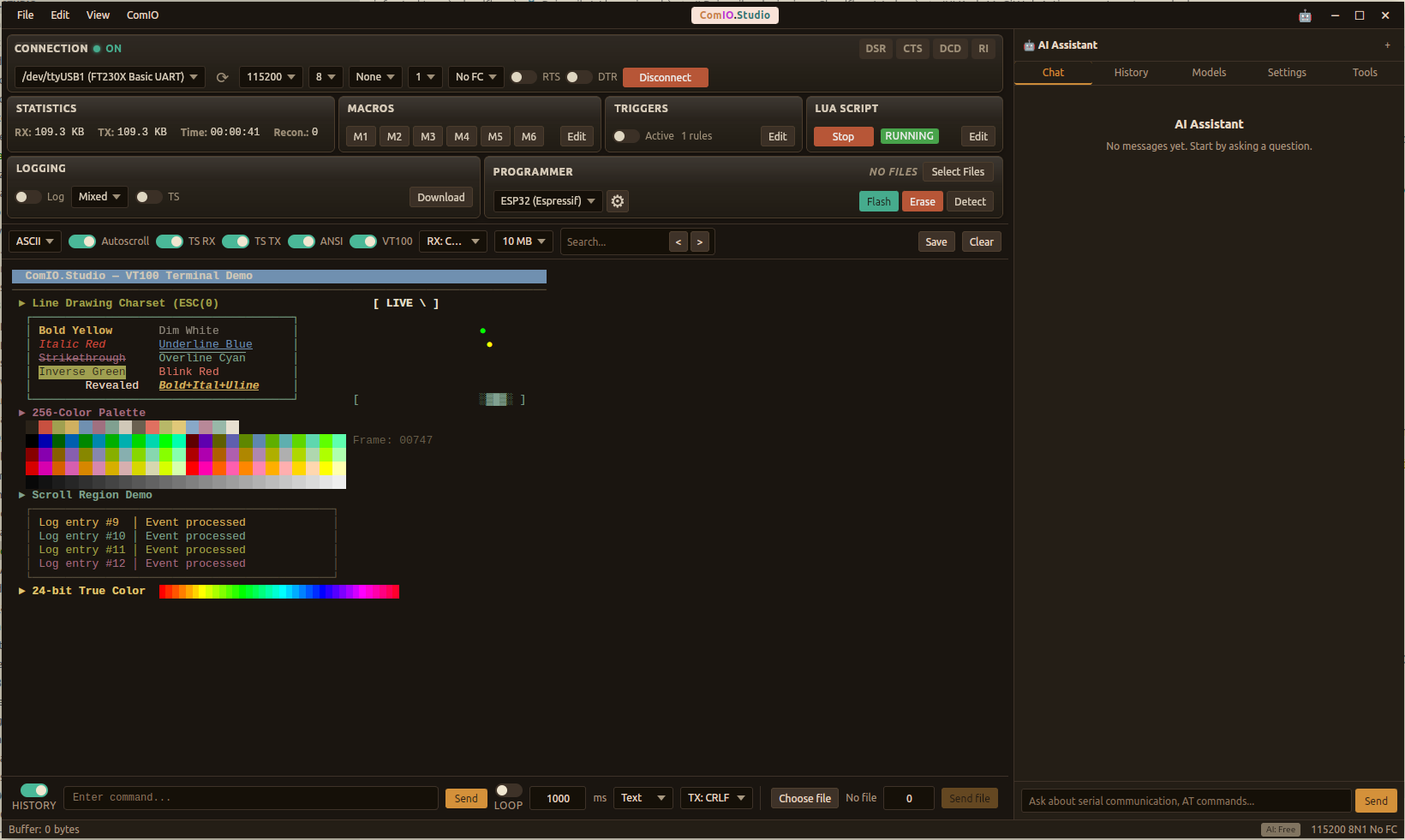

ComIO.Studio — AI-Powered Serial Terminal

What is ComIO.Studio?

ComIO.Studio is a professional desktop application for engineers, makers, and embedded developers who work with serial (UART/RS-232) devices every day. It replaces multiple tools — serial monitor, protocol analyzer, firmware flasher, and debugging assistant — with one unified application enhanced by artificial intelligence.

Whether you're debugging an ESP32 over UART, flashing firmware to an STM32, automating test sequences with Lua scripts, or decoding an unknown protocol — ComIO.Studio gives you everything in a single window, on any operating system.

Read full description & user guide →

Serial Terminal Features for Embedded Development

Professional-grade tools for ESP32, STM32, Arduino, AVR — and any UART/RS-232 device

Serial

Serial Communication

Full port configuration — baud rate, parity, data/stop bits, flow control. RS-232 and RS-485 support. Real-time RTS, DTR, DSR, CTS, DCD, RI line monitoring. Works with Modbus RTU devices, VFDs, PLCs, and industrial sensors.

AI Assistant

AI Assistant

Built-in AI that understands your serial data context. Ask questions, get protocol analysis, decode hex payloads, troubleshoot connections.

Data Analysis

Data Analysis

Configurable data buffer, ASCII/HEX encoding, search, timestamps. Connection statistics — RX/TX bytes, uptime, reconnections.

MCU Programming

MCU Programming

Flash firmware to ESP8266, ESP32, STM32, and AVR microcontrollers directly through the serial port (UART). No external programmers or tools needed — just connect via USB-to-serial and flash.

Macros & Triggers

Macros & Triggers

Quick-access macros (M1–M6) for frequently used commands. Automatic triggers with pattern matching for hands-free automation.

Cross-Platform

Cross-Platform

Native performance on Linux, Windows, and macOS. Small footprint, fast startup, system-level access.
AI-Powered Debugging

The serial terminal is free. The AI assistant is available through affordable subscription plans and can help you with:

Protocol Analysis

Protocol Analysis

Paste raw hex data and AI identifies the protocol (Modbus RTU/ASCII, NMEA, AT commands, custom), decodes fields, and explains the structure. Ideal for debugging frequency inverters, PLCs, and RS-485 sensors.

Connection Debugging

Connection Debugging

AI sees your port config and terminal output. Ask "why is my device not responding?" and get actionable suggestions — baud mismatch, wiring, flow control.

Code Generation

Code Generation

Generate ready-to-use Lua automation scripts, AT command sequences, Modbus queries, or C/Python code snippets for your specific device.

Data Interpretation

Data Interpretation

Feed sensor readings, GPS coordinates, or telemetry frames — AI parses, converts units, spots anomalies, and summarizes trends.

Documentation Helper

Documentation Helper

Ask about chip registers, AT command syntax, baud rate calculations, or CRC algorithms — instant answers without leaving the terminal.

Flash Troubleshooting

Flash Troubleshooting

Having trouble flashing firmware? AI analyzes error logs, suggests boot mode wiring, identifies flash size mismatches, and guides you step by step.

Simple, Fair Pricing

The serial terminal is free. AI plans start at $3.90/month.

Free · ProBaud (BYOK) — use your own AI provider key and keep token costs under your control.

View All Plans & Compare →

Works Everywhere

Native cross-platform performance on every desktop OS

Linux, Windows, macOS